


Are you thinking about clearing the document clutter from your office to get into the right headspace and stay focused on your tasks? Document scanners can help turn piles of paper into digital files, saving time and hopefully lowering your cortisol levels. This article guides you through the main types of scanners and the key factors to consider, helping you choose a model that truly fits your needs.
Types of Document Scanners
Think of scanning physical documents, images and magazines as a way to turn paper piles into digital order and keep life simple. By doing this, you won’t have to dig through folders for receipts, contracts, or notes and still end up ot finding what you need. Instead, you can just look for them on your computer by their name in the search bar and reach them in seconds.
Having a precise and easy-to-use document scanner helps you stay organised and keeps your work desk feeling lighter. So, whether you’re working, studying, or just trying to stay on top of things, scanning makes it easier and a whole lot less stressful.
Flatbed Scanners
If you’re looking for a reliable scanner for everyday use at home or in the office, a flatbed document scanner is a solid option. These models work by placing your documents, photos, or even books on a flat glass surface to scan.
Although they are considered the at-home version of a scanner for documents, they deliver high-resolution results. The downside is that they’re larger, heavier, and can be pricy, but they’re very versatile.
Best for: photos, contracts, artwork, and books.
Drum Scanners
The professional version of document scanners is drum scanners, which are used in printing and art reproduction. They wrap film or documents around a rotating drum and make scans with very high resolutions, often exceeding 10,000 dpi.
The quality is unmatched, with excellent colour accuracy and detail. However, if you’re looking to buy document scanner, know that these are bulky, expensive, and require trained operators, so they’re not practical for everyday users.
Best for: printing houses, museums, and imaging studios.
Sheetfed Scanners
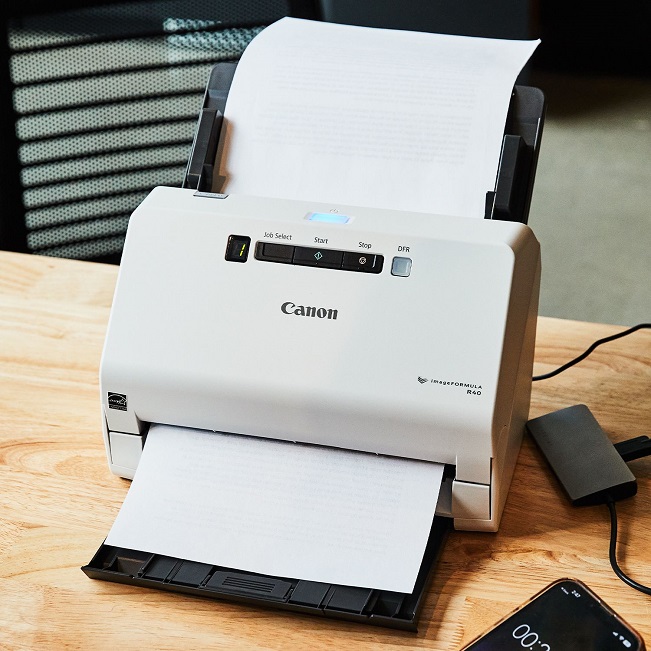
Sheetfed scanners are made for offices that deal with lots of paperwork daily. These scanners for documents allow you to feed a stack of papers into the automatic document feeder for quicker processing. Resolution is usually from 600 to 2400 dpi, which is just right for most office needs.
Even though they handle a larger number of documents at the same time, sheetfed scanners are still compact and don’t take up much space. The trade-off is that they can’t scan bound items like books, and their lifespan is often shorter because of all the heavy-duty work they do.
Best for: offices, finance teams, schools, and government records.
Portable Scanners
Portable scanners are small, lightweight, and great if you’re often on the move, as they are easy to carry. You can slide them over a document or use a mini feeder to scan on the go. They connect via USB, Wi-Fi, or Bluetooth, and some even have built-in batteries.
For the most part, portable scanners are very practical and convenient, but they’re not as precise as flatbeds. Still, they’re super handy for quick scans when travelling or working remotely.
Best for: travellers, finance professionals, students, and remote workers.
Handheld Scanners
Handheld scanners are another type of portable document scanner. They fit in your hand like a pen and let you move the device across the page yourself. They’re also compact and can scan items that don’t fit in flatbeds, like magazines or ID cards.
However, the resolution is lower, and you end up doing most of the work yourself. You’ll also need a steady hand and a bit more free time, as the process usually lasts longer. They’re best when portability matters more than perfect quality.
Best for: personal use, IDs, magazines, or small items.
Photo Scanners
For those who need a scanner that handles both documents and photos, but especially photos, photo-focused document scanners Australia-wide are a great choice for high-quality image digitisation. Unlike other document scanners, these use advanced sensors to capture every detail in photos, slides, and negatives, often at very high resolutions.
Many models include dust and scratch removal, which helps preserve old or delicate images. Photo scanners are a bit slower and more expensive, but still great for professionals or archives.
Best for: detailed photo work and archives.
Scanners come in many types, shapes and sizes, each one serving a different purpose. Which one you choose depends on your needs. No matter if it’s everyday paperwork, creative projects, or preserving history, there’s a scanner that meets your requirements.
Things to Look for When Choosing a Document Scanner
In today’s world, where everything is overstimulating, organisation can ease the mental toll by creating a sense of clarity and control. That’s why something as simple as a document scanner can make a day in the office far less stressful.
However, with many models available, here are the main factors to keep in mind before you buy document scanners:
- Scan Quality (Resolution): The resolution is measured in DPI (dots per inch) and determines the document clarity. If you’re working with text documents, 300-600 DPI is usually enough. For photos or detailed graphics, 600 DPI or higher is recommended.
- Speed and Efficiency: The speed of the scanner is measured in pages per minute (PPM). For personal use, look for document scanners online with 10 to 15 PPM. Busy offices, on the other hand, benefit from scanners with 30+ PPM.
- Connectivity Options: This one is another important one. You should consider what works best for you: USB for direct connections, Wi‑Fi for wireless scanning, and network scanning for shared office use.
- Software and Features: Good software can change your experience with document scanners. Look for useful features such as OCR (turning scans into editable text), duplex scanning, colour detection, blank page skipping, and batch scanning.
- Other Considerations: Think about scanning size (A4 vs. A3), compatibility with Windows/Mac, and whether the bundled software supports auto‑cropping or batch output.
By weighing resolution, speed, connectivity, and software features, you’ll be able to choose a scanner that matches your workflow.
Yes, paper piles can feel overwhelming, but scanning turns them into something simple and manageable. The right digital scanner takes the stress out of staying organised and keeps your desk feeling lighter. Once you find the one that fits your life, you’ll wonder how you ever managed without it.